
Sticker prices for learning management systems look tidy—until you add everything your team needs.
Most vendors tack on $500–$2,000 for onboarding, $1,000–$3,000 per year for premium support, and integration overages on top (see the detailed People Managing People pricing analysis).
We’ll unpack those hidden fees, compare ten leading platforms, and hand you a clear decision path so you can budget with eyes wide open.
The sneaky gap between sticker price and total cost
The number on an LMS pricing page looks tidy. Trouble is, that figure buys little more than log-in rights.
Most vendors add one-time “getting started” fees for migration, branding, or single sign-on. According to BetterBuys, Knowledge Anywhere, for example, lists a $3,000 implementation and training charge on top of its subscription.
Support repeats the pattern. Basic email help is included, yet 24/7 phone access or a dedicated success manager lives in a higher-priced tier. The low monthly rate you placed in the budget can jump by four figures before your first employee completes a course.
Then comes usage math. Many platforms charge by “active user,” not “registered user.” If 90 learners log in during safety-training week while your plan covers only 40, you pay overage fees for the extra 50.
Add-ons round out the pile-on: content libraries, AI course builders, compliance reports, white labeling, even HD-video storage. Each sounds minor until you map the costs across a three-year forecast.
That gap is why we judge platforms on total cost of ownership (TCO), not sticker price. The next sections group LMSs by pricing transparency, flag their biggest surprises, and show the math so you can choose the model that protects your budget.
GoSkills LMS
If you dislike contract gymnastics, GoSkills feels like a breath of fresh air.
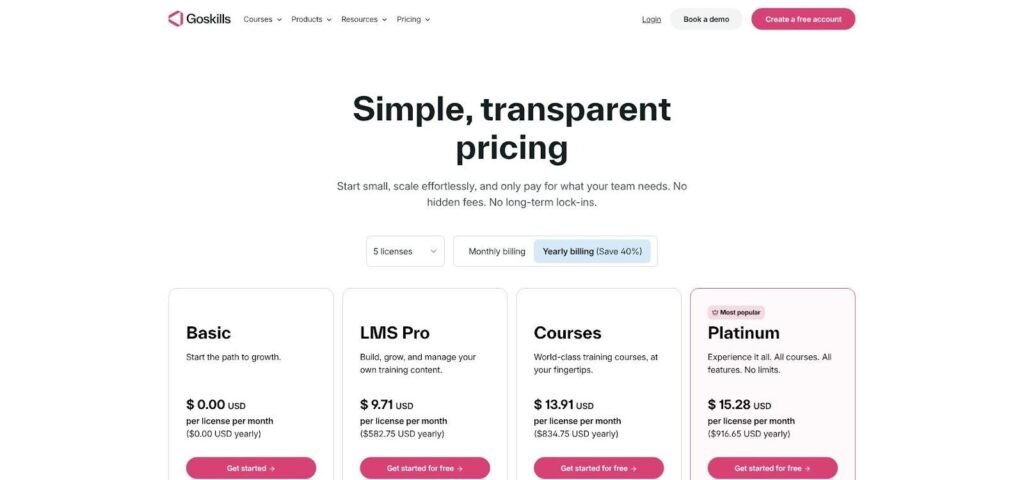
The platform charges a straight per-learner rate and lets you scale up or down monthly. No bundles to untangle, no annual lock-in. We found no mention of setup, migration, or “white-label” surcharges on its pricing page, a rare show of restraint in this market. That openness isn’t just website rhetoric. The company’s continually updated LMS comparison sets GoSkills’ per-learner price beside 22 competing platforms, surfacing common onboarding fees and premium-support surcharges that explain why sticker prices so rarely match final invoices.
GoSkills LMS Transparent Pricing Page Screenshot
That simplicity matters when headcount shifts. Add ten seasonal hires in July, pay for ten extra seats in July, then drop them in August. Finance sees a smooth, linear cost curve instead of jagged renewal cliffs.
GoSkills also includes its course library in the core license, so you avoid the common “content subscription” upcharge. The only optional extra we noted is a dedicated customer-success manager, offered as a service rather than a hidden gate.
When you’re running lean and need flexibility over feature bloat, GoSkills sets the transparency bar the rest of the list struggles to reach.
LearnDash
LearnDash flips the usual per-seat script. You pay one flat license ($199 per year for a single WordPress site) and can train as many people as you like.
That simplicity saves money fast once your roster tops fifty learners. The catch? You need a WordPress install and the technical skills to run it. Hosting, backups, and updates rest on your shoulders, so budget a bit for managed hosting or IT time.
Optional add-ons stay visible. Need advanced reporting or Tin Can support? Buy an extension from the marketplace, install it in minutes, and keep full ownership of your data. No surprise renewals, no seat-based escalators.
If your team already lives in WordPress, LearnDash delivers strong cost control. If not, weigh the hidden operational work before chasing the low sticker price.
MoodleCloud
MoodleCloud keeps the barrier to entry low. You can spin up a site in minutes, train up to fifty people for free, and move to a paid tier only when you pass that cap. The first paid plan sits near $170 per year, while the top small-team option (100 users and extra storage) stays under $1,800.
Costs remain linear because you do not pay per seat. You pay for the bucket: reach the user or storage ceiling and you jump to the next bucket. The model is predictable, visible, and easy to explain to finance.
The trade-off hides in administration. Even though Moodle hosts the instance, you still handle plugins, updates, and customizations. If you need single sign-on or advanced reporting, expect to explore the marketplace and budget staff hours rather than dollars.
MoodleCloud shines when your team is tech-comfortable and headcount steady. For everyone else, the low sticker price may hide the real currency: internal labor.
TalentLMS
TalentLMS packages its features into tidy seat buckets.
The Starter plan sits around $149 a month for 40 users, while Pro climbs to roughly $579 for 100 seats. Those caps are firm, so the forty-first or one-hundred-first learner bumps you straight into the next tier—a predictable but sometimes painful cliff.
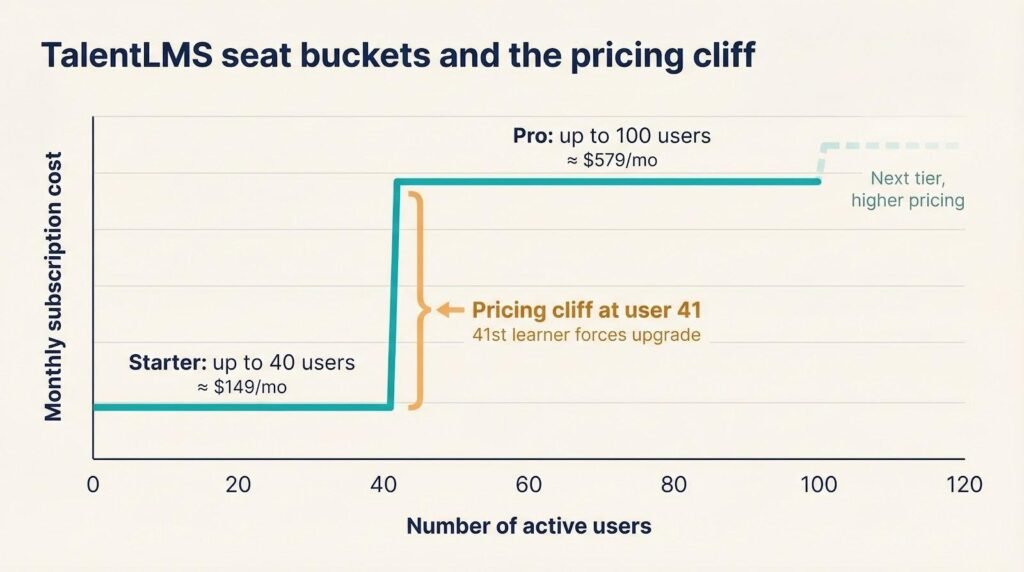
Headline costs look fair. The platform includes unlimited courses, mobile apps, and basic integrations. The fine print shows up when you need hands-on help. Priority support or a dedicated customer-success manager lives in premium tiers, and BetterBuys flags that as an added charge across the industry.
Bottom line: TalentLMS works best when your user count lines up neatly with its seat tiers and your team can thrive on standard support. If rapid growth or 24/7 assistance is likely, bake those jumps into the budget now, not after renewal.
LearnWorlds
LearnWorlds is built for companies that sell courses, so its pricing carries a sales focus.
The Starter plan advertises $29 per month. The fine print shows a five-dollar transaction fee on every course sale, a toll that grows with your success. Upgrade to Pro Trainer at about $99 a month and the fee disappears, but your base cost more than triples.
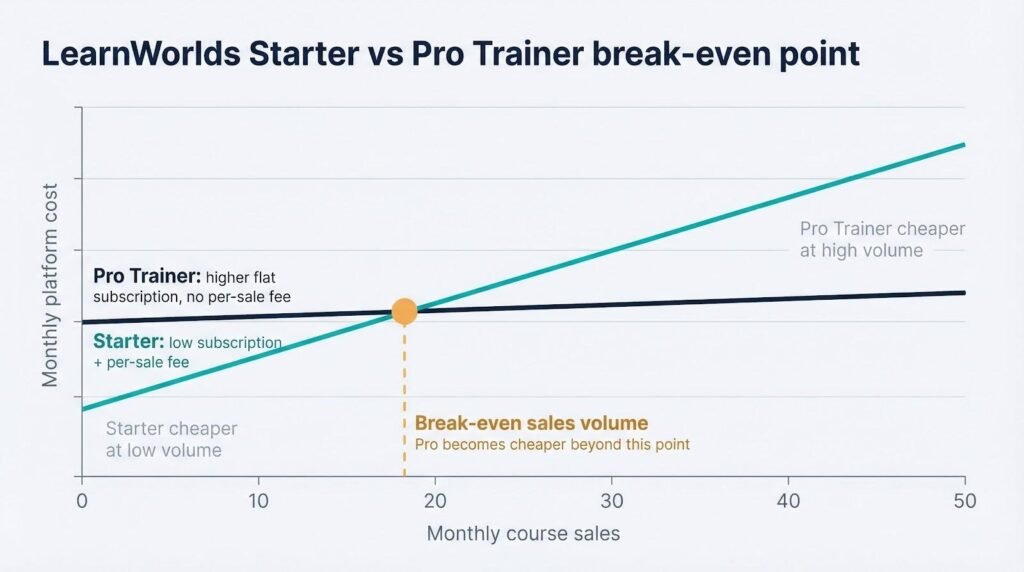
Beyond license shifts, most revenue-centric features, including coupons, affiliate tracking, and white-label branding, sit in higher tiers or as paid add-ons. If you rely on those tools to drive sales, assume the Pro plan is your real entry point.
For internal employee training the math flips. You still pay the platform fee, yet the course-sale commission offers no benefit. In that case, LearnWorlds seldom beats a seat-based LMS on pure cost.
Choose it when external revenue matters and you need a storefront, marketing tools, and an efficient checkout. Skip it if compliance tracking carries more weight than commerce.
360Learning
360Learning offers a straightforward pitch: peer-driven learning at eight dollars per user each month until you pass 100 learners. After that point, pricing shifts to custom quotes, and real numbers get scarce, according to Danfe.io.
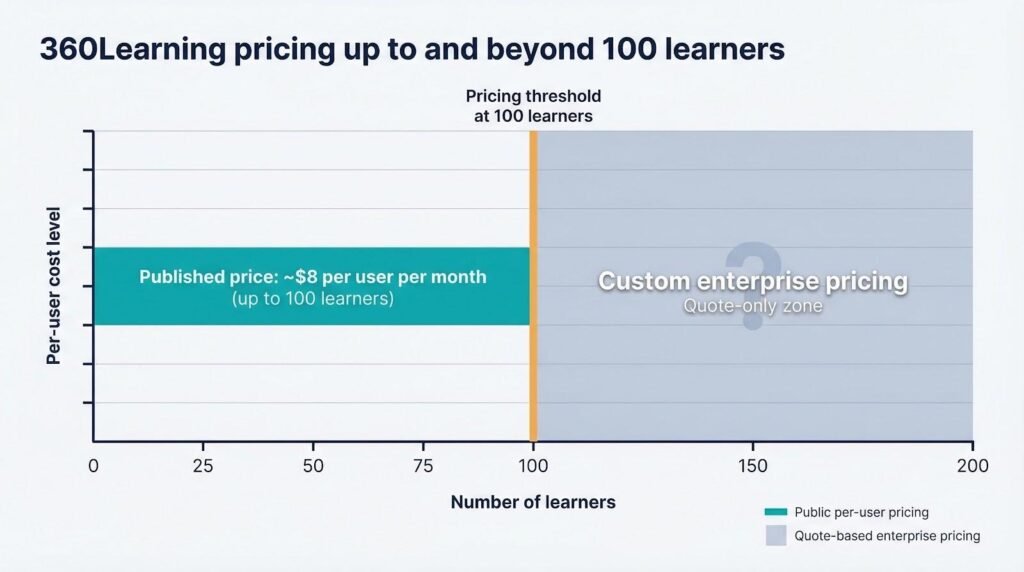
The up-front model is simple. Pay annually, invite the team, and you’re set. Implementation and basic support are included in the license, so your first invoice seldom surprises you. The risk appears later: onboarding another division, a seasonal contractor spike, or a merger can push you into enterprise pricing that may double or triple per-seat cost overnight.
Hidden fees stay low. 360Learning bundles authoring tools and a mobile app, and it has not yet started charging extra for AI co-authoring. If you need deep API integrations or single sign-on, expect professional-services quotes rather than flip-of-a-switch settings.
Choose 360Learning for cohorts below 100 who value social learning and can live with the hard cap. If you anticipate rapid growth, model the jump now so tomorrow’s surprise does not land on your CFO’s desk.
iSpring Learn
iSpring Learn looks affordable at first glance; the rate sits near $4.46 per user each month, but the platform requires a 300-seat minimum paid annually. That commitment locks you into roughly $1,350 every month, even if only half the seats stay active, reports Danfe.io.
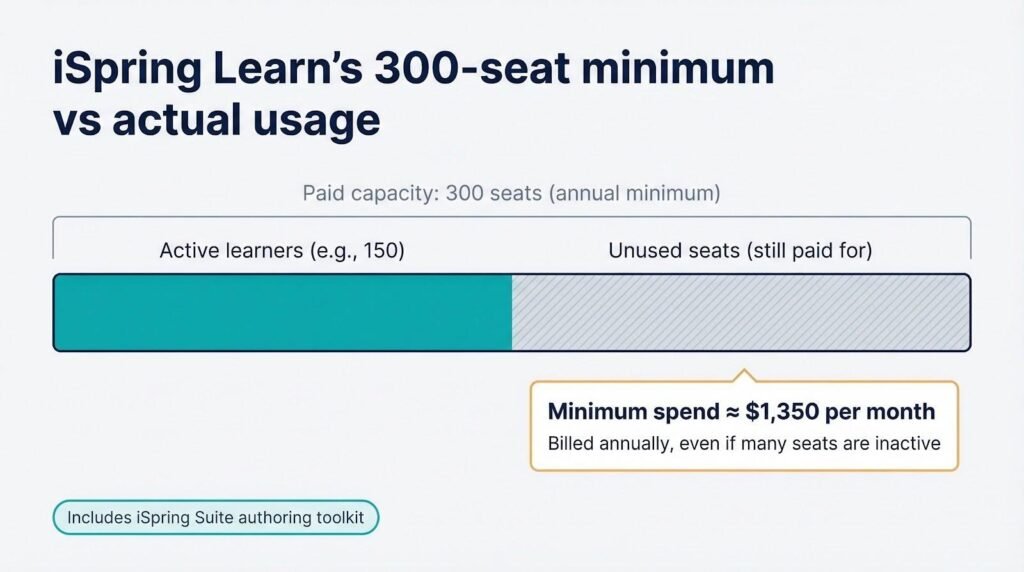
The bundle does include iSpring Suite, a full-featured course-authoring toolkit, so you avoid paying for a separate content studio. For teams already fluent in PowerPoint, that perk carries real value.
Costs creep in two places. First, there is no monthly billing, so cash flow must cover a full year up front. Second, premium support—phone access or a named success manager—lives behind an extra fee that BetterBuys warns can surprise buyers.
If you need built-in authoring and know you will keep at least 300 learners engaged, iSpring Learn’s flat rate can beat per-seat rivals. Just be ready to pay for the entire banquet, not individual appetizers.
Absorb LMS
Absorb keeps its pricing under wraps. No public price grid, no “starting at” teaser. BetterBuys notes that Absorb requires a direct quote before sharing any figures.
Customer anecdotes place entry packages in the low-to-mid five figures per year for roughly 100 to 250 users, then costs rise as you add extra portals or e-commerce modules.
Implementation is not self-serve. Professional services scope, configure, and train your admins, and those hours appear as a line item.
Support follows the enterprise pattern. Basic email help is included, but 24/7 phone access, a named customer-success manager, and quarterly health checks become an annual service contract. Add the optional content library and AI recommendations, and the total climbs quickly.
Absorb earns its keep when you need strict compliance tracking, multi-tenant portals, and the security paperwork large corporations demand. For smaller teams the cost-to-value ratio is often hard to justify, but in regulated industries the platform’s audit trails can command a premium.
Docebo
Docebo blends LMS roots with LXP flair, and the price reflects that reach. Benchmarks place entry contracts near $15,000 to $25,000 per year for roughly one thousand learners, according to Danfe.io. After that base, every optional module—coaching, AI content tagging, extended-enterprise portals—adds its own annual fee.
Implementation is hands-on. Docebo’s team maps your content, builds integrations, and trains admins, work that often lands as a five-figure professional-services statement. Premium support follows the same pattern: a named customer-success manager, 24/7 escalation, and quarterly optimization reviews all sit in a higher-tier service plan.
The upside is genuine scale headroom and a library of pre-built connectors that can spare your developers time. If you need multilingual portals, automated skill tagging, or deep analytics for thousands of employees, Docebo earns its keep. For smaller teams, the license alone can match a full year of a mid-market competitor’s total cost of ownership.
Northpass
Northpass went quiet on pricing after its LinkedIn Learning tie-up. Public tiers disappeared, replaced by a “Request demo” form. BetterBuys groups it with vendors that reveal numbers only after discovery calls.
Prior to the acquisition, Northpass reportedly charged around $12 to $15 per active user each month at 50- to 100-seat volumes. Enterprise buyers now say quotes arrive as bundled packages that mix LMS licenses with LinkedIn course-library access and premium support, pushing annual minimums toward the mid-five figures.
The platform excels at fast customer-education rollouts. Pre-built paths, Salesforce connectors, and white-label portals can trim weeks off a launch schedule, a real cash saver if you sell software training or franchise onboarding.
Bottom line: expect a quote-only model and budget like an enterprise LMS. If your roadmap leans heavily on LinkedIn Learning content, the native integration may justify the spend. If not, similar functionality exists for less elsewhere.
Conclusion
Sticker prices tell only half the story. The real cost of an online course platform depends on per-seat fees, content-hosting limits, and whether the LMS charges extra for certificates or analytics dashboards. Run a 12-month projection with your actual headcount before committing, and start with a free trial wherever one is offered so you can test the learner experience firsthand.
